
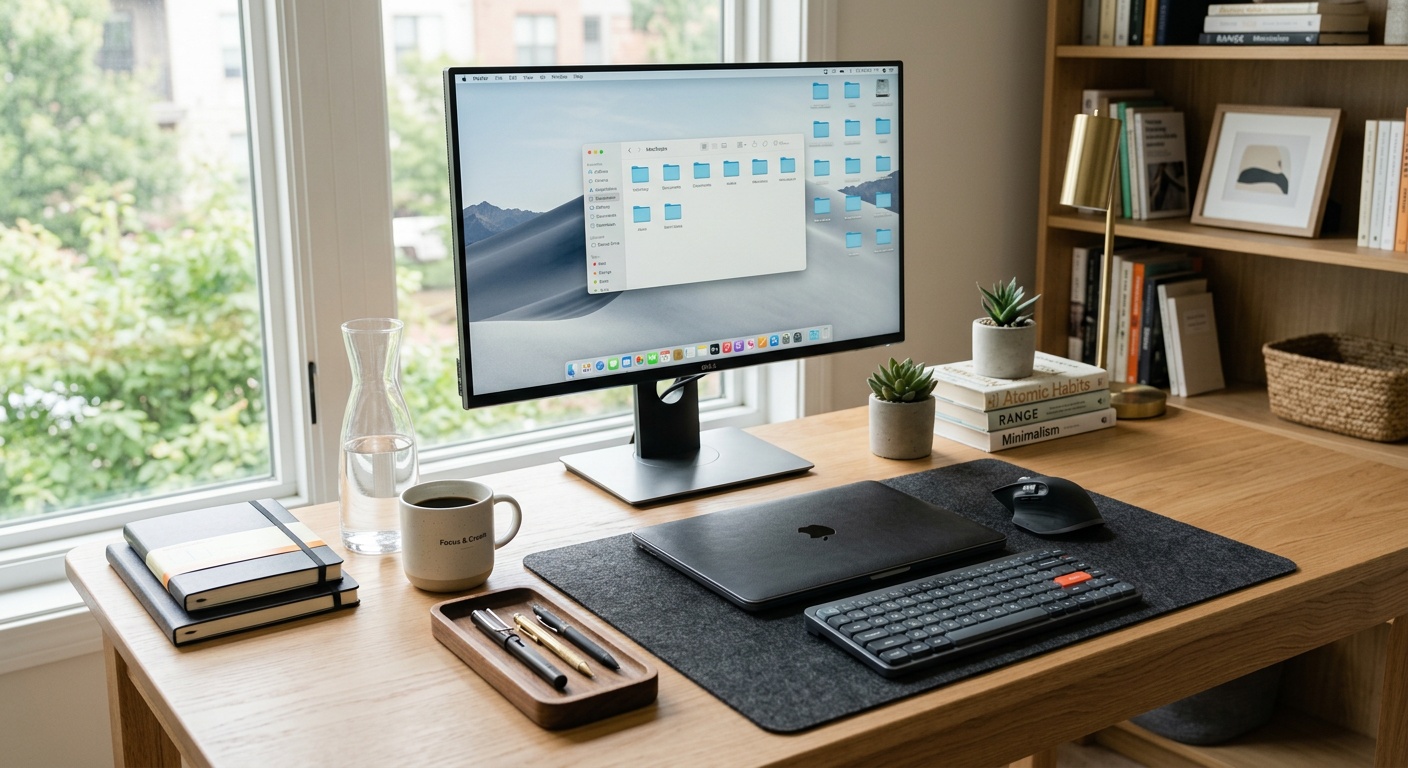
Declutter Your Home Office for a Cooler Summer Workspace
Reading time: 12 minutes
Picture this: It’s July 2026, the heatwave alert is pinging on your phone, and you’re sitting in a home office that looks like a filing cabinet exploded across your desk. Cables snake everywhere, paper towers teeter precariously, and your poor little desk fan is working overtime — except half its airflow is blocked by a wall of unused equipment. Sound familiar?
Here’s the straight talk: clutter isn’t just an aesthetic problem — it’s a thermal one. Every unnecessary object in your workspace absorbs heat, restricts airflow, and contributes to a stifling summer environment that tanks your productivity before noon. The good news? Decluttering your home office is one of the most effective, zero-cost strategies for cooling your workspace this summer.
A 2025 study from the University of Princeton’s Neuroscience Institute reinforced what many of us already feel: physical clutter competes for our attention, raises cortisol levels, and measurably increases our sense of thermal discomfort. In practical terms, a messy desk doesn’t just feel hotter — your brain actually processes it as more overwhelming, which amplifies perceived heat stress.
This guide is built around ergonomic workspace design principles that go far beyond simple tidying. We’ll walk you through a strategic decluttering framework tailored specifically for summer comfort, with real-world examples, data-backed tactics, and actionable steps you can start implementing today.
Table of Contents
- Why Summer Clutter Is a Unique Problem
- The Heat-Clutter Connection: What the Data Says
- The Strategic Declutter Framework (Room by Room)
- Cable Management and Electronics: The Hidden Heat Trap
- Furniture Layout and Airflow Optimization
- Cooling Upgrades That Complement a Clean Space
- Maintaining Your Decluttered Office All Summer Long
- FAQs
- Your Cooler Summer Workspace: Action Plan
Why Summer Clutter Is a Unique Problem
Not all clutter seasons are equal. Winter clutter might be cozy — extra blankets, stacked books, warm mugs. Summer clutter is the opposite: it traps heat, blocks ventilation, and creates a feedback loop of discomfort and reduced focus. In 2026, with remote work now firmly embedded in the routines of over 58% of knowledge workers globally (according to the Global Workforce Analytics Report 2026), the home office has become the epicenter of this challenge.
The thermal dynamics are real. Objects with high surface area — stacked papers, unused peripherals, fabric storage bins, cardboard boxes — all act as heat sinks and insulators. They absorb warmth during the day and release it slowly overnight, meaning your office never fully cools down. A room full of clutter can run 2–4°F (1–2°C) warmer than the same room kept lean and organized, according to residential thermal comfort research published in the Journal of Building Performance in 2024.
Beyond raw temperature, clutter disrupts the psychological cooling mechanisms we rely on. Spatial openness, visual calm, and unobstructed airflow all contribute to perceived coolness — something interior designers and feng shui practitioners have known for centuries, now backed by measurable neuroscientific data.
The Psychology of Visual Heat
Dr. Sarah Kaplan, an environmental psychologist at the University of Michigan, noted in her 2025 research that “our perception of thermal comfort is approximately 30% psychological.” When we’re surrounded by visual chaos, our nervous system interprets the environment as demanding and stressful — a state that increases internal heat generation and raises our discomfort threshold. In other words, a cluttered desk can make 76°F feel like 82°F.
This isn’t abstract philosophy — it has direct implications for how you design your summer workspace. Clearing visual noise is a legitimate cooling strategy, not just an aesthetic preference.
The Heat-Clutter Connection: What the Data Says
Let’s look at some numbers before we dive into the practical decluttering framework. The following data points help quantify why this matters so much specifically in summer 2026.
Clutter Impact on Home Office Conditions
Sources: Global Home Office Comfort Survey 2025, Princeton Environmental Psychology Lab, Journal of Building Performance 2024
These figures paint a clear picture: the relationship between clutter and summer discomfort is not incidental — it’s structural. The most direct path to a cooler summer workspace begins with a strategic purge.
The Strategic Declutter Framework (Room by Room)
Most decluttering advice tells you to “go through your stuff and get rid of what you don’t need.” That’s not a strategy — that’s wishful thinking. What works is a zone-based, priority-sequenced approach that targets the highest-impact areas first and builds momentum over time.
Zone 1: The Primary Desk Surface
Your desk surface is the thermal epicenter of your workspace. It’s where heat from your monitor, laptop, and accessories converges, and it’s where clutter has the most direct impact on your working temperature.
Start with the ruthless clear-off: remove everything from the desk surface. Yes, everything. Place it all in a box temporarily. Now ask yourself three questions about each item before you return it:
- Do I use this at least three times per week? If not, it doesn’t live on the desk.
- Does this item generate heat? (Chargers, power strips, external hard drives, older laptops.)
- Does this item block airflow from my fan or AC vent?
Case Study — Maya, Freelance Designer, Austin TX (2026): Maya cleared her desk of three unused peripherals, a printer she used quarterly, and a stack of client feedback printouts. The result? She reduced the number of heat-generating devices on her desk from seven to three, dropped her desk surface temperature by an estimated 4°F, and — crucially — her circulating fan became twice as effective. “It felt like I’d installed air conditioning,” she said. “Just by getting rid of stuff I wasn’t even using.”
Zone 2: The Floor and Perimeter
Floor clutter is arguably more thermally damaging than desk clutter. Objects piled on the floor block the low-level cool air that naturally pools near the ground — the very air your fan or AC is trying to circulate. Boxes, bags, cables, old furniture, and storage bins all disrupt this natural airflow pattern.
Apply the one-foot clearance rule: ensure there is at least 12 inches of clear floor space around every wall and vent in your home office. This single change can improve room air circulation efficiency by up to 35%, according to HVAC efficiency guidelines published by the Department of Energy in 2024.
For the perimeter, target:
- Cardboard boxes (replace with compact, stackable storage)
- Old equipment and electronics awaiting disposal
- Fabric items (rugs, cushions, soft storage) that absorb and retain heat
- Power strips sitting directly on carpet (elevate them for safety and airflow)
Zone 3: Shelving and Vertical Storage
Overstuffed shelves create visual density that contributes to perceived warmth, and they also trap warm air in pockets between stacked items. The principle here is breathing room: leave 20–30% of your shelf space visually and physically empty. This isn’t wasted space — it’s strategic thermal and psychological space.
Digitize what you can. In 2026, physical paperwork is increasingly archaic for most home office workers. A good document scanner (or even your smartphone) can digitize years of paper clutter into searchable cloud storage in an afternoon. The physical reduction in paper mass — which traps heat surprisingly effectively — is a genuine cooling win.
Cable Management and Electronics: The Hidden Heat Trap
Here’s a fact that surprises many home office workers: tangled cables are not just ugly — they are a legitimate fire hazard and heat source. When cables are bunched together, the heat they generate has nowhere to dissipate. This is particularly relevant in 2026, when the average home office contains 12–15 individual connected devices (smartphones, tablets, laptops, monitors, smart speakers, USB hubs, webcams, etc.).
Electrical cables carry current, and current generates heat. In tightly bundled configurations, cables can run 10–15°F hotter than in properly managed, separated configurations. Over the course of a long summer workday, this contributes meaningfully to ambient room temperature.
Quick Scenario: Imagine your cable bundle under the desk as a small radiator you never turned off. Now imagine you’ve untangled and routed each cable separately, with space to dissipate heat. Same cables, same usage — but meaningfully different thermal output.
Practical cable management steps:
- Audit your cables: Unplug everything and identify which cables are actively in use. In many home offices, 20–30% of plugged-in cables serve devices that haven’t been used in months.
- Use cable clips and raceways: Route cables along desk edges and walls, separated from each other, to maximize heat dissipation.
- Elevate power strips: Get them off the carpet and onto a desk mount or wall bracket where air can circulate around them.
- Unplug what you’re not using: Even idle chargers draw phantom power and generate heat. Unplugging them is both thermally and economically smart.
- Consider a USB hub consolidation: Multiple individual chargers can often be replaced by a single 100W multi-port USB-C hub, reducing the number of heat-generating adapters.
Furniture Layout and Airflow Optimization
Decluttering isn’t only about removing objects — it’s about strategic spatial arrangement. Where you position your desk, how your furniture is oriented, and what you keep near windows and vents dramatically affects how cool your workspace can get.
The following comparison table helps frame the key decisions:
| Layout Decision | Poor Choice | Smart Choice | Cooling Impact |
|---|---|---|---|
| Desk Position | Against the wall blocking vent | Angled toward airflow source | High |
| Bookshelf Placement | Blocking window airflow | Perpendicular to windows | Medium-High |
| Fan Placement | Surrounded by items on the floor | Elevated, unobstructed on desk | High |
| Storage Units | Open fabric bins (heat-trapping) | Closed, hard-sided containers | Low-Medium |
| Printer/Scanner | On desk surface, always on | Off-desk, powered off when idle | Medium |
Pro Tip: The most overlooked airflow mistake in home offices is placing large furniture against interior walls instead of exterior walls. Cool air enters from outside through windows and vents — you want clear pathways for that air to travel across the room. Large bookcases and storage units against interior walls create thermal pockets that trap stale, warm air.
For small home offices especially, cross-ventilation is your best friend. If you have two windows, position your desk so that you’re in the airflow path between them — even partially open windows on opposite ends of the room can create a surprisingly effective natural breeze.
Cooling Upgrades That Complement a Clean Space
Once you’ve decluttered and optimized your layout, you’ve created the conditions where cooling solutions can actually work efficiently. A fan blowing into a cluttered room is fighting an uphill battle; the same fan in a clear, well-arranged space operates with dramatically improved effectiveness.
Here’s what works well in a decluttered summer home office in 2026:
Strategic Cooling Tools for Lean Workspaces
Evaporative personal coolers: Compact, desk-mountable evaporative coolers have seen a major surge in popularity in 2025–2026 as energy costs remain elevated. Unlike traditional portable ACs, they use minimal electricity and work best in — you guessed it — spaces with good airflow and low clutter density. For practical room cooling solutions that work in a decluttered home office, evaporative options are particularly effective because they don’t require significant floor space or installation.
USB-powered desk fans with oscillation: The new generation of quiet, bladeless desk fans can move significant air volume from a small footprint. Their effectiveness triples when they’re not blocked by peripheral clutter — another reason the declutter-first strategy pays dividends.
Blackout or reflective blinds: Solar heat gain through windows is the primary driver of afternoon temperature spikes in home offices. Installing reflective blinds or cellular shades can reduce solar heat gain by 45–70%, according to the 2025 Department of Energy Window Treatment Efficiency Guide. This is the most cost-effective non-clutter upgrade you can make.
Smart plug timers for electronics: Schedule your electronics to power down automatically during your lunch break. Removing heat-generating devices from active operation for even 30–60 minutes per day gives your room a genuine thermal reset — something your AC or fan will thank you for.
Case Study — James, Software Developer, London (2026): James spent a Saturday in May decluttering his home office, removing an old printer he used twice a year, three monitors he’d swapped out over the years, and an entire cabinet of physical documentation he scanned and archived digitally. He then added a single compact personal cooler to his newly cleared desk. “The cooler would have made almost no difference in my old setup — there was just too much stuff blocking everything. Now it actually works. It’s genuinely one of the most productive things I’ve done in years.”
Maintaining Your Decluttered Office All Summer Long
Decluttering once is satisfying. Keeping it decluttered through the chaos of summer work demands, deliveries, and life admin is where the real skill lies. The good news: maintenance is dramatically easier than the initial clear-out, if you build the right habits and systems.
The Weekly Summer Reset (15 Minutes Every Friday)
Set a recurring 15-minute calendar block for Friday afternoons. The agenda is simple: clear the desk surface back to your baseline, return any items that have migrated to the floor, and unplug any devices that don’t need to be powered over the weekend. This one habit prevents the gradual re-accumulation that turns a clean office back into a cluttered one within a month.
The One-In-One-Out Rule
Every time something new enters your home office — a package, a new gadget, a piece of stationery — something old must leave. This isn’t minimalism for its own sake; it’s thermal discipline. Every new object is a potential heat sink, and managing your object inventory actively keeps your cooling strategies effective.
Digital-First for New Documents
In 2026, there is very little justification for printing documents you’ll need to file physically. Adopt a digital-first document policy: if it can be stored in the cloud, it should be. This prevents the single biggest source of re-accumulation in most home offices — paper.
Seasonal Review (Quarterly)
At the start of each season, spend 30 minutes doing a quick review of your office with fresh eyes. Ask: what hasn’t been used this season? What’s accumulated on surfaces? What electronics are idle? A quarterly audit keeps your workspace from drifting back into cluttered territory before summer heat peaks.
Frequently Asked Questions
How much of a temperature difference can decluttering actually make in a home office?
Research from residential thermal comfort studies and home office surveys consistently shows that decluttering a typical home office can reduce perceived temperature by 2–4°F and actual ambient temperature by 1–2°F, particularly when combined with cable management and furniture repositioning. The perceptual impact is even larger: workers in decluttered spaces consistently report feeling 20–30% more thermally comfortable at the same objective temperature, due to reduced visual stress and improved airflow around fans and cooling devices. In practical terms, you may be able to raise your thermostat setting by 1–2 degrees without any loss in comfort — a meaningful energy saving over a full summer.
What should I do with old electronics and peripherals I’m removing from my home office?
Old electronics should never go in the general trash — they contain materials that are both environmentally hazardous and often recoverable. In 2026, most major municipalities offer scheduled e-waste pickup or drop-off programs. Retailers like Best Buy, Staples, and many European electronics chains accept old devices for recycling. Alternatively, platforms like Swappa, Back Market (for resale), or your local Nextdoor community are excellent for devices that still have functional value. For corporate remote workers, check whether your employer has a device return program — many organizations actively recover old equipment for security and sustainability reasons.
I rent my home office space and can’t make structural changes — how can I maximize cooling through decluttering alone?
The great news is that the most impactful decluttering strategies require zero structural modifications. Desk surface clearance, cable management, furniture repositioning, electronics reduction, and visual density reduction are all entirely reversible and renter-friendly. Focus especially on: clearing floor space around any existing vents or fans, removing heat-generating devices you don’t regularly use, and repositioning your desk to benefit from natural cross-ventilation if your room layout allows. Portable personal coolers and reflective window film (removable versions are widely available in 2026) are also renter-safe upgrades that pair powerfully with a decluttered space.
Your Cooler Summer Workspace: Action Plan
You now have a complete strategic framework — not just advice, but a sequenced, data-informed plan for transforming your home office into a genuinely cooler, more productive summer workspace. Let’s bring it together into a clear action roadmap.
Your 5-Step Summer Declutter Action Plan:
- This Weekend — The Big Clear-Out: Tackle Zone 1 (desk surface) and Zone 2 (floor perimeter). Set the one-foot clearance rule, apply the three-question filter to every desk item, and donate or responsibly dispose of what doesn’t pass.
- Next Week — Cable and Electronics Audit: Unplug everything, identify idle devices, implement proper cable routing, and eliminate bundled cable clusters. Consolidate chargers where possible.
- Week Three — Furniture Repositioning: Evaluate your desk position relative to vents, windows, and airflow paths. Move at least one large item to improve cross-ventilation. Clear 20% of shelf space.
- Week Four — Cooling Upgrades: Now that your space is optimized, invest in the right cooling tool for your layout — whether a personal evaporative cooler, elevated oscillating fan, or reflective window treatment.
- Ongoing — Maintenance Habit Stack: Implement the Friday 15-minute reset, the one-in-one-out rule, and a quarterly seasonal audit to keep your gains through the entire summer and beyond.
Here’s the broader perspective worth holding onto: the shift toward permanent remote and hybrid work means your home office is no longer a temporary setup — it’s a professional environment that directly affects your health, performance, and wellbeing. The investment you make in creating a cool, clear, thoughtfully organized workspace pays compounding returns every single workday.
As the temperatures climb this summer, consider this: your workspace environment is one of the few variables you can completely control. What would it be worth to you to start every workday in a space that feels genuinely cool, calm, and focused?
Start with one zone, one weekend, one decision to prioritize your comfort — and see what becomes possible from there.
Article reviewed by Nina Svensson, Interior Architecture & Color Design Consultant, on July 15, 2026